
codeformer AI视频去码、图片修复
目录
Introduction to the environment
OS: CentOS7.9.2009Mem: 12G | |
CPU: 4C | |
Disk: 80G | |
Network: Bridge | |
IP: 192.168.1.120/24 |
install python
yum -y install wget zlib zlib-devel bzip2-devel openssl-devel \ncurses-devel sqlite-devel readline-devel tk-devel gdbm-devel \ | |
db4-devel libpcap-devel xz-devel libffi-devel gcc gcc-c++ \ | |
vim mesa-libGL.x86_64 git | |
mkdir /software /usr/local/python3 && cd /software | |
wget https://www.python.org/ftp/python/3.11.1/Python-3.11.1.tgz | |
tar xf Python-3.11.1.tgz | |
cd Python-3.11.1 | |
./configure prefix=/usr/local/python3 --with-ensurepip=install | |
make -j4 && make install | |
vim /etc/profile | |
export PYTHON_HOME=/usr/local/python3 | |
export PATH=$PYTHON_HOME/bin:$PATH | |
source /etc/profile | |
python3 --version | |
install conda
wget https://mirrors.bfsu.edu.cn/anaconda/archive/Anaconda3-2022.10-Linux-x86_64.sh --no-check-certificatebash Anaconda3-2022.10-Linux-x86_64.sh | |
接下来会出现一堆的License许可声明,注:按空格键来一页一页的翻 | |
出现如下文字,输入yes | |
Do you accept the license terms? [yes|no] | |
[no] >>> yes | |
接下来要选择安装目录,如果无需更改直接回车即可,如需更改要输入绝对路径: | |
注:可以先查看下硬盘的挂载情况再自行选择安装目录 (df -Th) | |
Anaconda3 will now be installed into this location: | |
/root/anaconda3 | |
- Press ENTER to confirm the location | |
- Press CTRL-C to abort the installation | |
- Or specify a different location below | |
[/root/anaconda3] >>> /anaconda3 # 不需要提前创建/anaconda3目录,如无则会新创建 | |
等一会儿后会问是否需要进行conda的初始化,建议输入no。 | |
若选择yes会在/root/.bashrc目录中自动添加环境变量,会使得开机自动启动base环境。 | |
(这里应该是新版安装包的改动之处,老版本的安装包都是问是否需要添加conda至环境变量, | |
且默认直接回车Enter是不添加,若未添加后续需要手动添加) | |
Do you wish the installer to initialize Anaconda3 | |
by running conda init? [yes|no] | |
[no] >>> no | |
看到如下提示则安装成功: | |
Thank you for installing Anaconda3! | |
================================================================== | |
Working with Python and Jupyter is a breeze in DataSpell. It is an IDE | |
designed for exploratory data analysis and ML. Get better data insights | |
with DataSpell. | |
DataSpell for Anaconda is available at: https://www.anaconda.com/dataspell | |
# 因为在初始化时选择了no,即不自动配置环境变量所以安装完后要手动配置 | |
echo 'export PATH=/anaconda3/bin:$PATH' >> /etc/profile | |
source /etc/profile | |
echo $PATH | |
# 查看conda版本 | |
conda --version | |
# conda基本命令 | |
conda create -n opop python=3 #创建python3(.11)的opop虚拟环境 | |
conda activate opop #开启opop环境 | |
# conda deactivate #关闭环境,这里不能正常退出,需要exit退出整个连接重新登录 | |
conda env list #显示所有的虚拟环境 | |
conda info --envs #显示所有的虚拟环境 | |
conda list #查看已经安装的文件包 | |
conda list -n opop #指定查看opop虚拟环境下安装的package | |
conda update opop #更新xxx文件包 | |
conda uninstall opop #卸载xxx文件包 | |
# 环境的创建、删除、清理 | |
conda create -n xxxx python==3.11 创建名字是xxxx且默认python版本是3.7的虚拟环境 | |
conda remove -n xxxx --all 创建xxxx虚拟环境 | |
conda clean -p 删除没有用的包 | |
conda clean -t 删除tar包 | |
conda clean -y --all 删除所有的安装包及cache | |
# 克隆oldname环境为newname环境 | |
conda create --name newname --clone oldname | |
# 彻底删除旧环境 | |
conda remove --name oldname --all | |
# 包的查找、安装、删除 | |
conda search -t conda tensorflow 查找 | |
conda show <USER/PACKAGE> 显示信息 | |
conda show tensorflow | |
conda install --channel https://conda.anaconda.org/anaconda tensorflow=1.8.0 指定源的安装 | |
install pytorch
Official website
pytorch官网
nvidia官网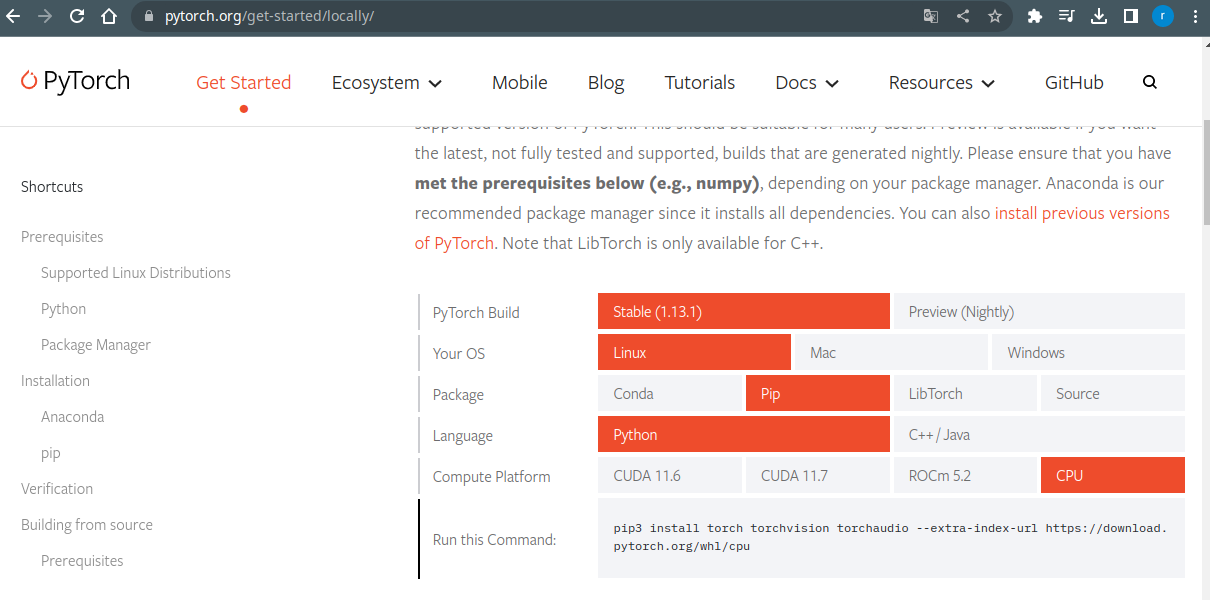
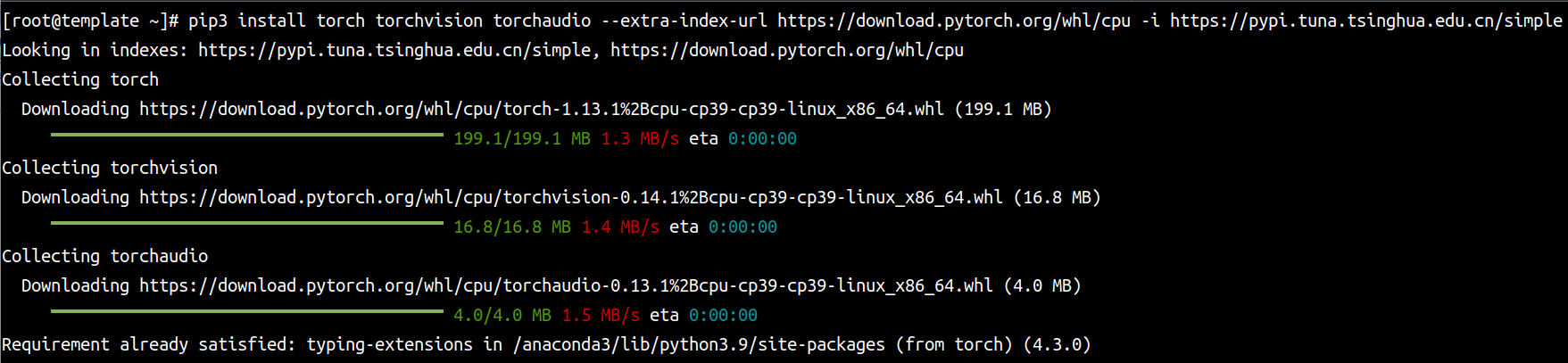
# 因为我用的是虚拟机,虚拟机中没有GPU,所以我在Compute Platform项中选用的CPU 且通过pip安装,下面是用CPU的安装命令,如你用的CUDA1也有对应的版本和安装命令pip3 install torch torchvision torchaudio --extra-index-url https://download.pytorch.org/whl/cpu -i https://pypi.tuna.tsinghua.edu.cn/simple | |
install Other packages (in required)
# git clone repositorygit clone --depth=1 git@github.com:sczhou/CodeFormer.git | |
cd CodeFormer | |
===================================== | |
# create new anaconda env | |
conda create -n codeformer python=3 -y | |
conda activate codeformer | |
===================================== | |
# install python dependencies | |
[root@template CodeFormer]# pwd | |
/root/CodeFormer | |
# 安装依赖 | |
pip3 install -r requirements.txt | |
# 安装可视化页面 | |
pip3 install gradio | |
python basicsr/setup.py develop | |
# 报错 | |
File "/anaconda3/lib/python3.9/site-packages/PIL/Image.py", line 100, in <module> | |
from . import _imaging as core | |
ImportError: /lib64/libstdc++.so.6: version `CXXABI_1.3.9' not found (required by /anaconda3/lib/python3.9/site-packages/PIL/../../.././libLerc.so) | |
# 解决 | |
wget http://mirror.centos.org/centos/7/os/x86_64/Packages/libstdc++-4.8.5-44.el7.i686.rpm | |
yum -y install libstdc++-4.8.5-44.el7.i686.rpm | |
[root@template CodeFormer]# find / -name libstdc++.so.6 | |
/usr/lib64/libstdc++.so.6 | |
/usr/lib/libstdc++.so.6 | |
/anaconda3/pkgs/libstdcxx-ng-11.2.0-h1234567_1/lib/libstdc++.so.6 | |
/anaconda3/lib/libstdc++.so.6 | |
/anaconda3/envs/codeformer/lib/libstdc++.so.6 | |
/anaconda3/envs/opop/lib/libstdc++.so.6 | |
[root@template CodeFormer]# strings /anaconda3/lib/libstdc++.so.6 | grep CXXABI_1.3.9 | |
CXXABI_1.3.9 | |
CXXABI_1.3.9 | |
[root@template CodeFormer]# mv /usr/lib64/libstdc++.so.6{,-bak} | |
[root@template CodeFormer]# cp /anaconda3/lib/libstdc++.so.6 | |
/usr/lib64/ | |
# Let's do it again | |
python basicsr/setup.py develop | |
# 安装2个训练模型 | |
python3 scripts/download_pretrained_models.py facelib # facelib训练 | |
python3 scripts/download_pretrained_models.py CodeFormer # CodeFormer预训练 | |
How to USE
[root@template CodeFormer]# pwd/root/CodeFormer | |
[root@template CodeFormer]# ll | |
总用量 64 | |
drwxr-xr-x 2 root root 4096 1月 24 10:00 assets | |
drwxr-xr-x 10 root root 4096 1月 24 11:02 basicsr | |
drwxr-xr-x 2 root root 4096 1月 24 10:58 basicsr.egg-info | |
drwxr-xr-x 5 root root 4096 1月 24 10:00 facelib | |
-rw-r--r-- 1 root root 12401 1月 24 10:00 inference_codeformer.py | |
drwxr-xr-x 4 root root 4096 1月 24 10:00 inputs ====> 这个目录 | |
-rw-r--r-- 1 root root 1717 1月 24 10:00 LICENSE | |
-rw-r--r-- 1 root root 8032 1月 24 10:00 README.md | |
-rw-r--r-- 1 root root 194 1月 24 10:00 requirements.txt | |
drwxr-xr-x 2 root root 4096 1月 24 10:00 scripts | |
drwxr-xr-x 4 root root 4096 1月 24 10:00 web-demos | |
drwxr-xr-x 4 root root 4096 1月 24 10:00 weights | |
# 待修复的图片都放到如下目录中 | |
[root@template CodeFormer]# ll inputs/cropped_faces/ | |
总用量 3836 | |
-rw-r--r-- 1 root root 158278 1月 24 10:00 0143.png | |
-rw-r--r-- 1 root root 190663 1月 24 10:00 0240.png | |
-rw-r--r-- 1 root root 184493 1月 24 10:00 0342.png | |
-rw-r--r-- 1 root root 188567 1月 24 10:00 0345.png | |
-rw-r--r-- 1 root root 192242 1月 24 10:00 0368.png | |
-rw-r--r-- 1 root root 213670 1月 24 10:00 0412.png | |
-rw-r--r-- 1 root root 175751 1月 24 10:00 0444.png | |
-rw-r--r-- 1 root root 179744 1月 24 10:00 0478.png | |
-rw-r--r-- 1 root root 231675 1月 24 10:00 0500.png | |
-rw-r--r-- 1 root root 184343 1月 24 10:00 0599.png | |
-rw-r--r-- 1 root root 191366 1月 24 10:00 0717.png | |
-rw-r--r-- 1 root root 157743 1月 24 10:00 0720.png | |
-rw-r--r-- 1 root root 172957 1月 24 10:00 0729.png | |
-rw-r--r-- 1 root root 139246 1月 24 10:00 0763.png | |
-rw-r--r-- 1 root root 172497 1月 24 10:00 0770.png | |
-rw-r--r-- 1 root root 162554 1月 24 10:00 0777.png | |
-rw-r--r-- 1 root root 184199 1月 24 10:00 0885.png | |
-rw-r--r-- 1 root root 171865 1月 24 10:00 0934.png | |
-rw-r--r-- 1 root root 326792 1月 24 10:00 Solvay_conference_1927_0018.png | |
-rw-r--r-- 1 root root 313098 1月 24 10:00 Solvay_conference_1927_2_16.png | |
# 开始修复 | |
# github上也有修复命令的说明,如下 | |
# For cropped and aligned faces | |
python inference_codeformer.py -w 0.5 --has_aligned --input_path [image folder]|[image path] | |
# 这里使用目录进行修复,即该目录下的所有图片都修复 | |
[root@template CodeFormer]# python3 inference_codeformer.py -w 0.5 --has_aligned --input_path /root/CodeFormer/inputs/cropped_faces/ | |
Background upsampling: False, Face upsampling: False | |
[1/20] Processing: 0143.png | |
[2/20] Processing: 0240.png | |
[3/20] Processing: 0342.png | |
[4/20] Processing: 0345.png | |
[5/20] Processing: 0368.png | |
[6/20] Processing: 0412.png | |
[7/20] Processing: 0444.png | |
[8/20] Processing: 0478.png | |
[9/20] Processing: 0500.png | |
[10/20] Processing: 0599.png | |
[11/20] Processing: 0717.png | |
[12/20] Processing: 0720.png | |
[13/20] Processing: 0729.png | |
[14/20] Processing: 0763.png | |
[15/20] Processing: 0770.png | |
[16/20] Processing: 0777.png | |
[17/20] Processing: 0885.png | |
[18/20] Processing: 0934.png | |
[19/20] Processing: Solvay_conference_1927_0018.png | |
[20/20] Processing: Solvay_conference_1927_2_16.png | |
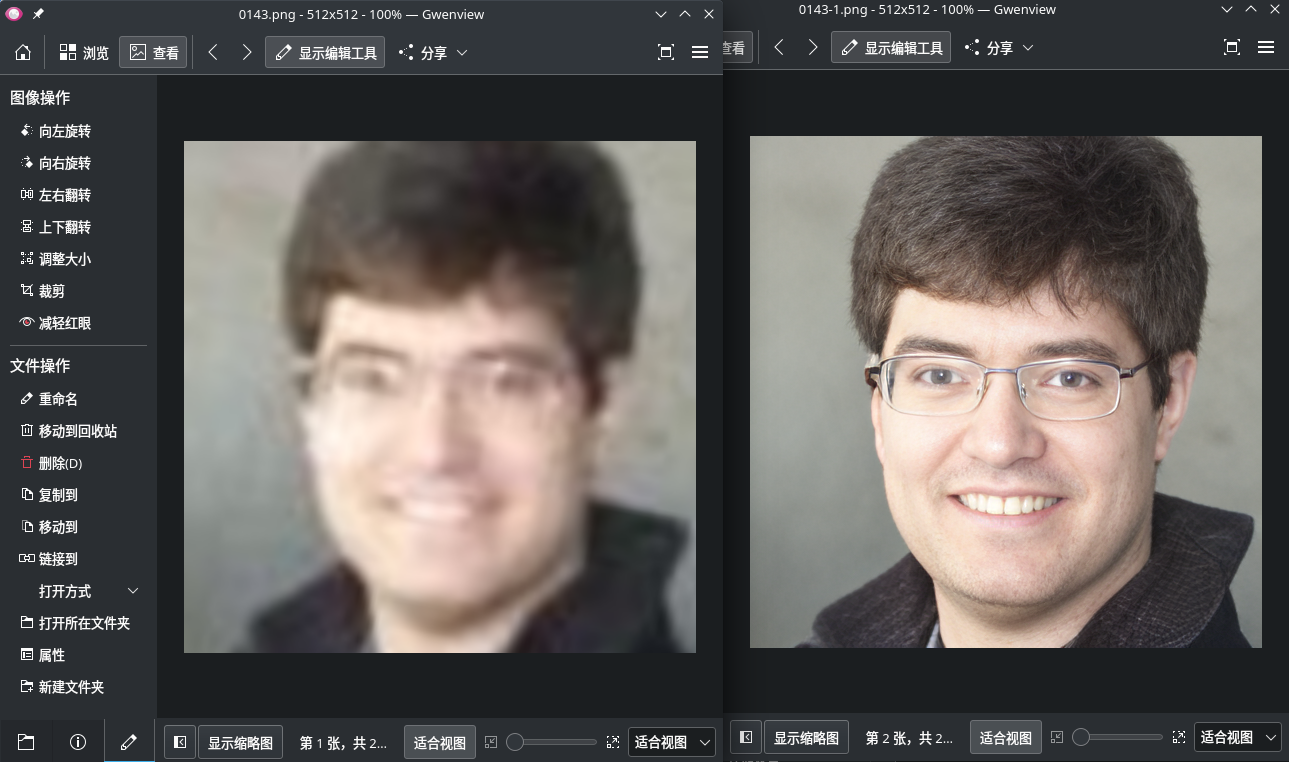
All results are saved in results/cropped_faces_0.5 # 修复好的图片保存位置 | |
[root@template CodeFormer]# ll results/cropped_faces_0.5/restored_faces/ | |
总用量 8492 | |
-rw-r--r-- 1 root root 417385 1月 24 11:30 0143.png | |
-rw-r--r-- 1 root root 428293 1月 24 11:30 0240.png | |
-rw-r--r-- 1 root root 409355 1月 24 11:31 0342.png | |
-rw-r--r-- 1 root root 417624 1月 24 11:31 0345.png | |
-rw-r--r-- 1 root root 458831 1月 24 11:31 0368.png | |
-rw-r--r-- 1 root root 467723 1月 24 11:31 0412.png | |
-rw-r--r-- 1 root root 483361 1月 24 11:31 0444.png | |
-rw-r--r-- 1 root root 404973 1月 24 11:31 0478.png | |
-rw-r--r-- 1 root root 499201 1月 24 11:31 0500.png | |
-rw-r--r-- 1 root root 451767 1月 24 11:31 0599.png | |
-rw-r--r-- 1 root root 429104 1月 24 11:31 0717.png | |
-rw-r--r-- 1 root root 438074 1月 24 11:31 0720.png | |
-rw-r--r-- 1 root root 403600 1月 24 11:31 0729.png | |
-rw-r--r-- 1 root root 388215 1月 24 11:31 0763.png | |
-rw-r--r-- 1 root root 410207 1月 24 11:32 0770.png | |
-rw-r--r-- 1 root root 404081 1月 24 11:32 0777.png | |
-rw-r--r-- 1 root root 437555 1月 24 11:32 0885.png | |
-rw-r--r-- 1 root root 459740 1月 24 11:32 0934.png | |
-rw-r--r-- 1 root root 458208 1月 24 11:32 Solvay_conference_1927_0018.png | |
-rw-r--r-- 1 root root 395568 1月 24 11:32 Solvay_conference_1927_2_16.png | |
[root@template CodeFormer]# | |
修复多人的照片(整体图像增强)
# github上的使用说明# For whole image | |
# Add '--bg_upsampler realesrgan' to enhance the background regions with Real-ESRGAN | |
# Add '--face_upsample' to further upsample restorated face with Real-ESRGAN | |
python inference_codeformer.py -w 0.7 --input_path [image folder]|[image path] | |
[root@template CodeFormer]# cp inputs/cropped_faces/1111.jpg inputs/old/ | |
[root@template CodeFormer]# ll inputs/old/1111.jpg | |
-rw------- 1 root root 61843 1月 24 12:00 inputs/old/1111.jpg | |
[root@template CodeFormer]# python3 inference_codeformer.py -w 0.7 --input_path /root/CodeFormer/inputs/old/ | |
Face detection model: retinaface_resnet50 | |
Background upsampling: False, Face upsampling: False | |
[1/1] Processing: 1111.jpg | |
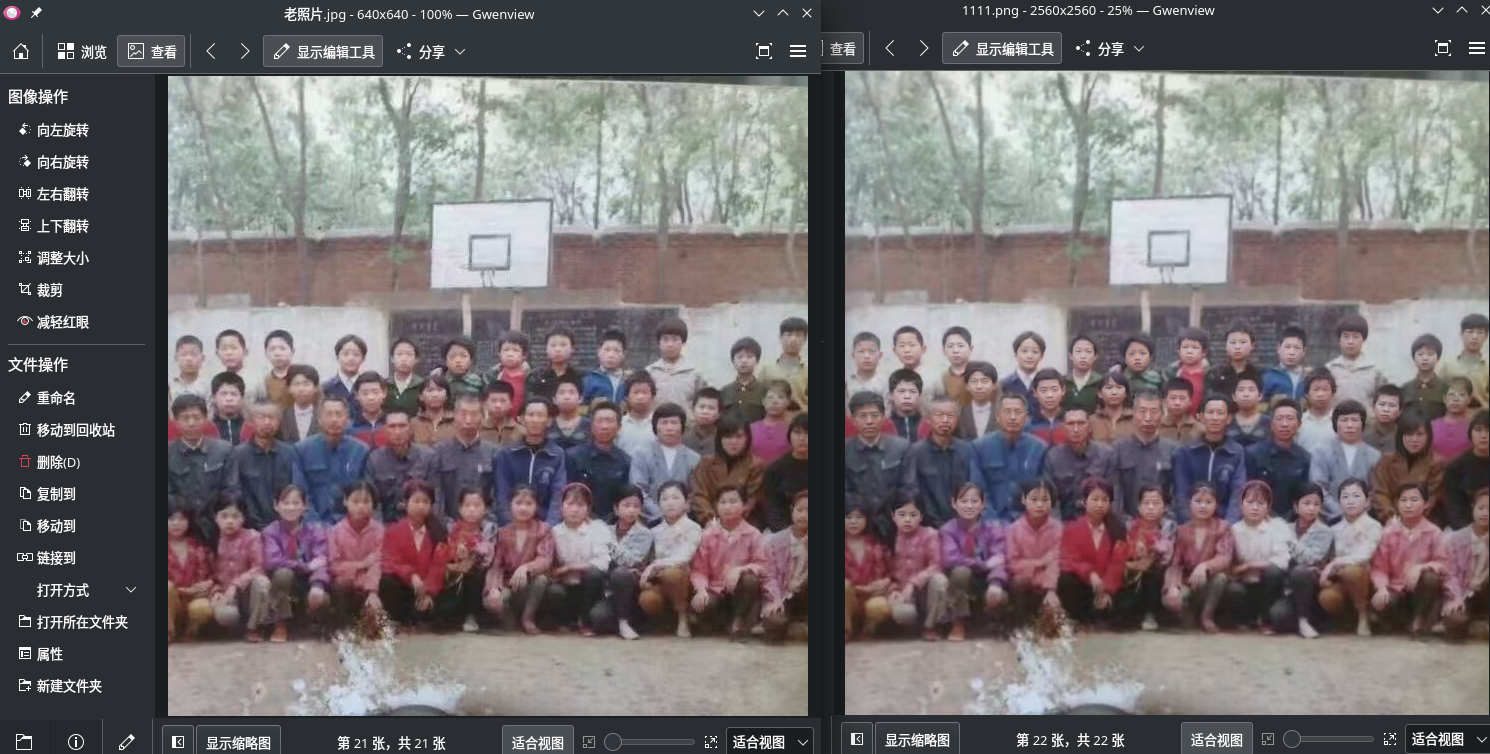
detect 33 faces # 识别到33张脸 | |
All results are saved in results/old_0.7 | |
注:这里的多人照片还显得有点"力不从心",或许是没有使用GPU导致的修复不完美,具体还不确定,如果你的电脑有GPU不妨亲自测一下效果 | |
修复视频
# For Windows/Mac users, please install ffmpeg firstconda install -c conda-forge ffmpeg | |
# For video clips | |
# video path should end with '.mp4'|'.mov'|'.avi' | |
python3 inference_codeformer.py --bg_upsampler realesrgan --face_upsample -w 1.0 --input_path [Video DIR] | |
注1:保真权重 w 位于 [0, 1] 中。通常,较小的w倾向于产生更高质量的结果,而较大的w会产生更高的保真度结果 | |
注2:修复视频非常消耗显卡,如果你的显卡10分给力,那不用多久将会结束,反之会很消耗时间 |